 JewelMatch Hub
JewelMatch Hub
JewelMatch Hub
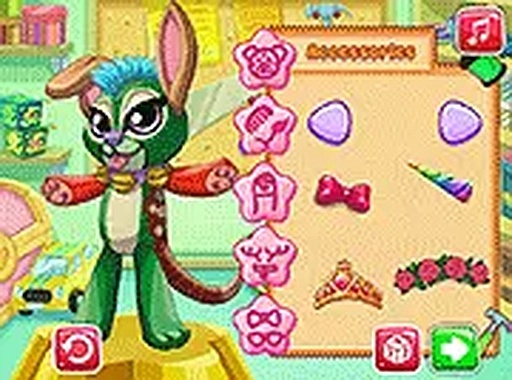
Toy Creator Design Studio offers a wonderful creative outlet for children. The simple click-and-choose interface makes it easy for young players to design unique toys. With a wide variety of body shapes, eyes, mouths, and accessories, the possibilities are nearly endless. The game is completely free, with no ads or in-app purchases, and works perfectly on mobile devices. It is a safe, family-friendly activity that encourages imagination and self-expression.
Toy Creator Design Studio is a creative and safe online game where you design your own toy from scratch. You start with a blank canvas and choose from a variety of body shapes, eye colors and styles, mouths, horns, ears, and fun accessories. The game encourages imagination and self-expression without any violence or inappropriate content. It runs directly in your browser on desktop or mobile, with no downloads or sign-ups required. This makes it easy for children and families to jump in and start creating right away. Whether you want a cute, silly, or unique toy, the possibilities are endless. The interface is colorful and intuitive, designed for young players and beginners. You can play alone or with siblings, sharing ideas and designs. Toy Creator Design Studio is a wonderful way to spend quality time while nurturing creativity.
Playing Toy Creator Design Studio is simple and intuitive. First, select a body shape for your toy from several options. Next, choose an eye color and style that fits your design. Then pick a mouth, horns, ears, and any other accessories you like. Use easy touch or click controls to browse through the choices. The game responds instantly, so you can try different combinations quickly. Once you are happy with your toy, you can save it or share it with friends. The game supports full-screen mode for a more focused experience. There are no timers or scores, so you can take your time and experiment freely. This makes it perfect for young children who are learning to use a mouse or touchscreen. Parents can feel confident that the game is safe and easy to navigate.
Creative toy design with mix and match options. Free to play with no downloads. Mobile-friendly and works on any device. Full-screen mode for an immersive experience. No ads or in-app purchases. Safe for children of all ages.
To get the most out of Toy Creator Design Studio, let your imagination guide you. Try different combinations of body shapes, eyes, and accessories to discover unique looks. Experiment with colors and styles you wouldn't normally choose—you might be surprised by the result. Take your time and enjoy the process; there are no timers or scores, so relax and have fun. Share your creations with family or friends for extra inspiration. The more you play, the more creative your toys will become.








Player Comments
Sign in to comment
You must be logged in before posting a review or rating.
No account? Create one
No comments yet. Be the first to comment!