 JewelMatch Hub
JewelMatch Hub
JewelMatch Hub
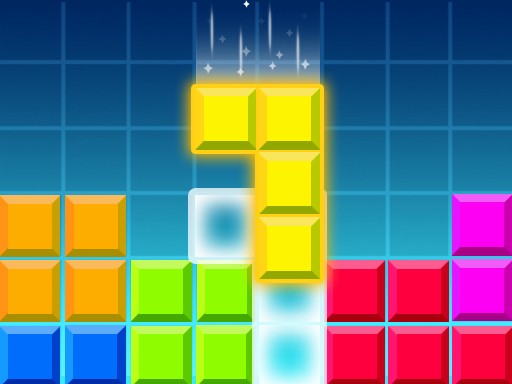
Classic Brick Puzzle delivers the timeless fun of arranging falling shapes with simple controls and a family-friendly design. The increasing speed keeps the challenge engaging without being overwhelming. It is perfect for quick breaks or longer sessions, and the clear visuals make it accessible to everyone.
Classic Brick Puzzle brings the timeless appeal of arranging falling shapes to your browser. The core objective is to guide descending pieces into complete rows or columns, which then disappear to make room for more. This game is based on a well-known puzzle concept that has entertained players for decades. With clear visuals and straightforward controls, it is easy to learn but offers a fresh challenge as the pace gradually increases. Whether you are a longtime fan of such puzzles or new to the genre, Classic Brick Puzzle provides a relaxing yet stimulating experience that is suitable for players of all ages. The game focuses on spatial reasoning and quick thinking, making it a great choice for both short breaks and extended play sessions.
Players typically use on-screen controls or keyboard arrows to move the falling shapes left, right, or down. Rotating the pieces before they land helps fit them into gaps to complete full rows or columns. When a row or column is entirely filled, it clears away and awards points. You can speed up the fall of a piece if you are satisfied with its placement. The game ends when the stacked pieces reach the top of the playing area. Practice your spatial skills and aim for high scores by clearing lines efficiently.
Classic puzzle gameplay that is easy to pick up. Simple controls suitable for all ages. Family-friendly content with no mature themes. Increasing difficulty keeps the challenge fresh over time. Suitable for quick breaks or longer play sessions. The game may include visual feedback for completed rows and a score tracker to monitor progress.
Focus on clearing rows efficiently by planning ahead. Rotate pieces early to find the best fit. Keep the stack low to avoid reaching the top quickly. Use the speed-up feature to place pieces faster when you are confident. Practice regularly to improve your reaction time and spatial awareness.






Player Comments
Sign in to comment
You must be logged in before posting a review or rating.
No account? Create one
No comments yet. Be the first to comment!